
SQLite, PostgreSQL, and MySQL
Create and test saved connections for SQLite, PostgreSQL, and MySQL or compatible MariaDB servers.
Database Explorer
Unfour includes a local database explorer for inspecting schemas and data, editing supported records, and running SQL as part of backend troubleshooting.
It is built for developers who need to verify database state behind an API symptom or server-side error without moving the investigation into a separate database tool.
Read the docs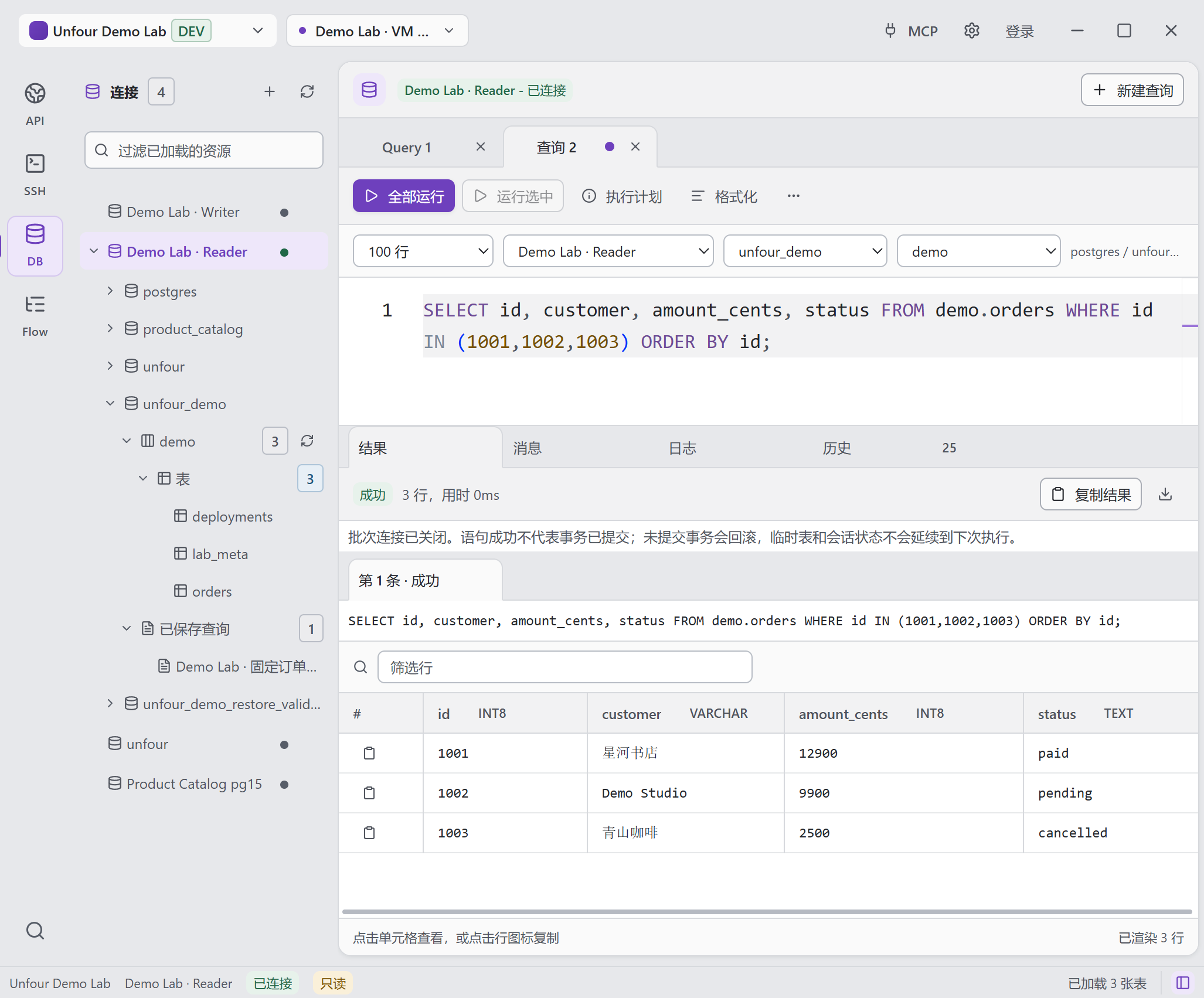
The same three demo orders, inspected through SQL. The connection, database, schema, query, and returned rows remain visible together.
Open full-size image to inspect detailsUse SQLite, PostgreSQL, and MySQL or compatible MariaDB servers. openGauss uses PostgreSQL-protocol connections, with table exports and consistent SQL execution context.
Create and test saved connections for SQLite, PostgreSQL, and MySQL or compatible MariaDB servers.
Connect through the openGauss preset using the PostgreSQL protocol, with server detection, catalog and table browsing, index metadata, and native table DDL improvements.
Export one table’s structure as SQL, its data as SQL, CSV, or JSON, or both as SQL. This is table export, not a whole-database backup.
Keep the selected database and schema when opening queries, running scripts, reopening history, or restoring Saved SQL. Saved queries are grouped under their database.
Browse catalogs, schemas, tables, columns, keys, indexes, and other available structure details.
Open supported tables, page through rows, and use server-backed filtering and sorting.
Stage and apply supported insert, update, and delete changes with review before execution.
Use Run All for the full editor script or Run Selected for highlighted SQL, then inspect each statement result. Whole-script checks run first and execution stops at the first error.
Expose saved connections, schema reads, read-only queries, explain output, and policy-controlled execution to MCP clients.
Evidence chain
When an API returns an unexpected order status, query that order in the intended database and schema. Compare the stored row with the response, save the query, and repeat it after a reviewed fix.
Database boundary
Use a supported database engine and review the target connection and SQL before running it. Schema and data changes require your decision; production safety also depends on database permissions.
Saved database credentials remain local by default.
Supported writes are reviewed and explicitly initiated.
Mutating or high-risk MCP actions are controlled by workspace policy and confirmation checks.
The developer remains responsible for the target environment and the SQL that runs.
Capture the request and response that exposed the data problem.
Explore API ClientInspect logs and runtime state before changing persisted data.
Explore SSH TerminalLet an AI agent gather database evidence through approved tools.
Explore MCP IntegrationDownload Unfour to inspect supported databases in the local workspace.